I had implemented an old x86 PC as my main router. Based on the AMD Kabini platorm, it draws about 35 watts, which is pretty good for a PC, but not the best for what I want from a router. I had experimented with OpnSense with it, but I didn’t enjoy OpnSense at all; I lost patience with it. I was able to brick it in about fifteen minutes trying to configure the firewall and port forwards. It was no time before I was installing OpenWRT and just calling that good enough. While OpnSense is this full-featured firewall that would be right at home in an enterprise environment, OpenWRT is built to be small and efficient, and I like that. Plus, OpnSense is built on BSD, and OpenWRT is a linux distribution. I much prefer Linux.
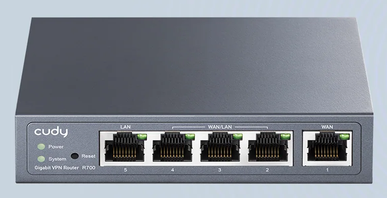
I was lightly shopping for a new router, and all I needed was OpenWRT compatibility, and I ran across the Cudy R700. This little box seemed too good to be true. For $40, you get five networking jacks, one WAN, one LAN, and three that can be configred as either WAN or LAN, giving it the ability to route multiple ISPs, if that’s what you’re into. It is powered by a dual-core MIPS chip manufactured by MediaTek. Best of all, at least to me, is it has no wireless hardware. It is just a router, and nothing more. Further, it comes with a modified version of OpenWRT out of the box, and a little digging revealed that installing the standard-release OpenWRT would be a snap, which is a must for me.
First of all, the table of hardware at OpenWRT.org has no device page like other devices, probably because this is more of a niche device marketed to small businesses, and OpenWRT is mostly about providing a wireless device alternative firmware for consumer devices, and it does that very well, but oddball devices sometimes will lack the best documentation. In the table of hardware, it reports that the device is compatible with the previous release of OpenWRT, 24.10.5, but I can confirm it works with the latest release, 25.12.5. This was the only thing that troubled me when I was deciding to buy it, but I looked at other devices with the same chipset, and all of them reported working wit the newest release, so I just figured I was seeing a documentation update issue and not a compatibility issue.
Before you can flash it with the newest image, you must go to the Cudy website and download an intermediate image. That page links to a Google drive folder, so just download the only file in there mentioning R700. If you try to flash it with the OpenWRT standard release, it will fail the signature check. I was able to flash it with that intermediate image with no issues at all. Once the flash completed, I could no longer access it with the 192.168.10.1 address printed on the bottom of the router. Instead, I used the OpenWRT default of 192.168.1.1.
Now, you can flash the latest release. From the table of hardware, product page, go to the firmware selector and download the sysupgrade image. Once I flashed it with the newest image, I was no longer to get to the device no matter what I tried, so I pressed the hard reset button, and once it reset, I was able to get to the device, and it was updated to the latest version. That was the lone hiccup.
From there, I just configured it. I was able to assign a port to the main LAN network, create another interface for the Guest network, and set up port forwards and firewall rules, just like any other OpenWRT device. I took down my old PC-based router, dropped in the new R700, and everything just worked. No issues at all.
I’ve had it in place less than 24 hours as I’m writing this, but so far, so good.
I want to point out that I also own the OpenWRT One router, which is an excellent device, but the price right now is running $150 on Amazon, up from the $85 price it had on its release. That’s pretty pricey for a wifi router that is a generation behind in its wifi standard, so this Cudy device, at $40, with its pure router functionality and Mips chip, represents a good deal. It has enabled me to offload routing to this power-sippng device and to use the OpenWRT One as a powerful access point.